The Guide to TendHunter's AI Document Assistant
Every bid manager knows the feeling: you've found a promising opportunity, but now comes the daunting task of dissecting a mountain of documents. The technical specifications, the consultation rules, the technical annexes... it's a time-consuming process, with the constant risk of missing a critical detail.
What if you could have an expert strategist by your side, an assistant that not only reads these documents, but also understands your company's strengths, the tender context, and the strategic landscape?
Discover TendHunter's AI Document Assistant. This is not a simple document analysis tool. It's your dedicated, contextual workspace, designed to transform raw information into a winning proposal. This guide will show you how to master this powerful feature to reduce submission risks, save dozens of hours, and significantly improve the quality of your bids.
1. How to Access the AI Document Assistant
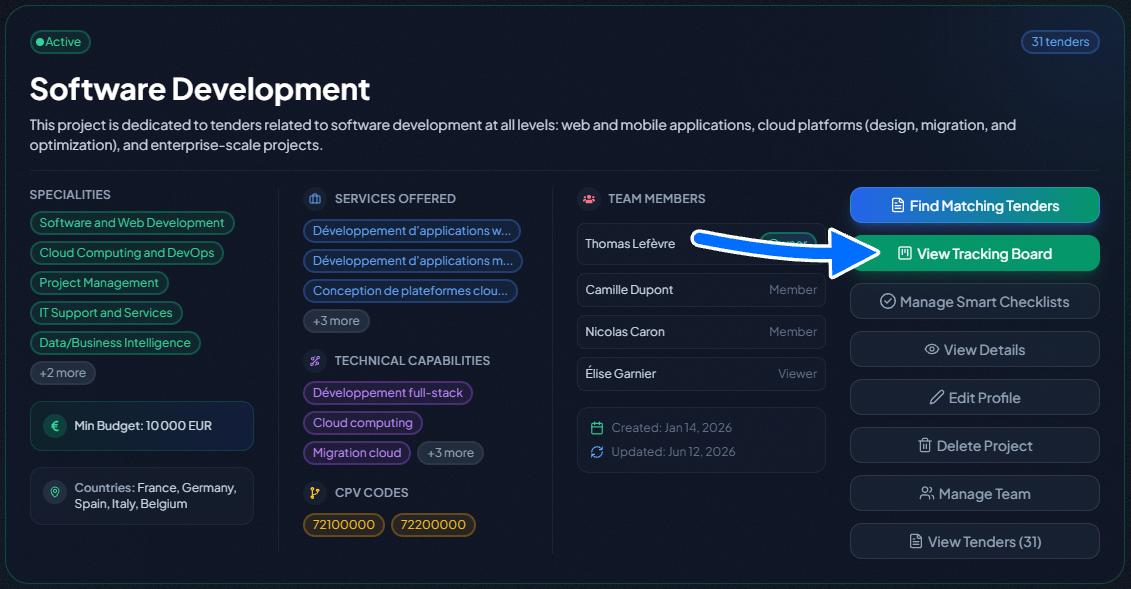
The AI Document Assistant is integrated into your project workspace on TendHunter.ai. Here's how to access it:
- Create a project on TendHunter.ai. During setup, you describe your company's specialties, technical capabilities, technologies, certifications, budget range, target countries, preferred languages, and relevant CPV codes.
- Add a tender from the public tenders page to your project. TendHunter's AI immediately calculates a match score and generates a detailed analysis including strengths, risks, strategic advice, and lot-by-lot scoring.
- Open the tracking board in your project workspace. Each tender is represented by a card that you can move through the stages of your pipeline.
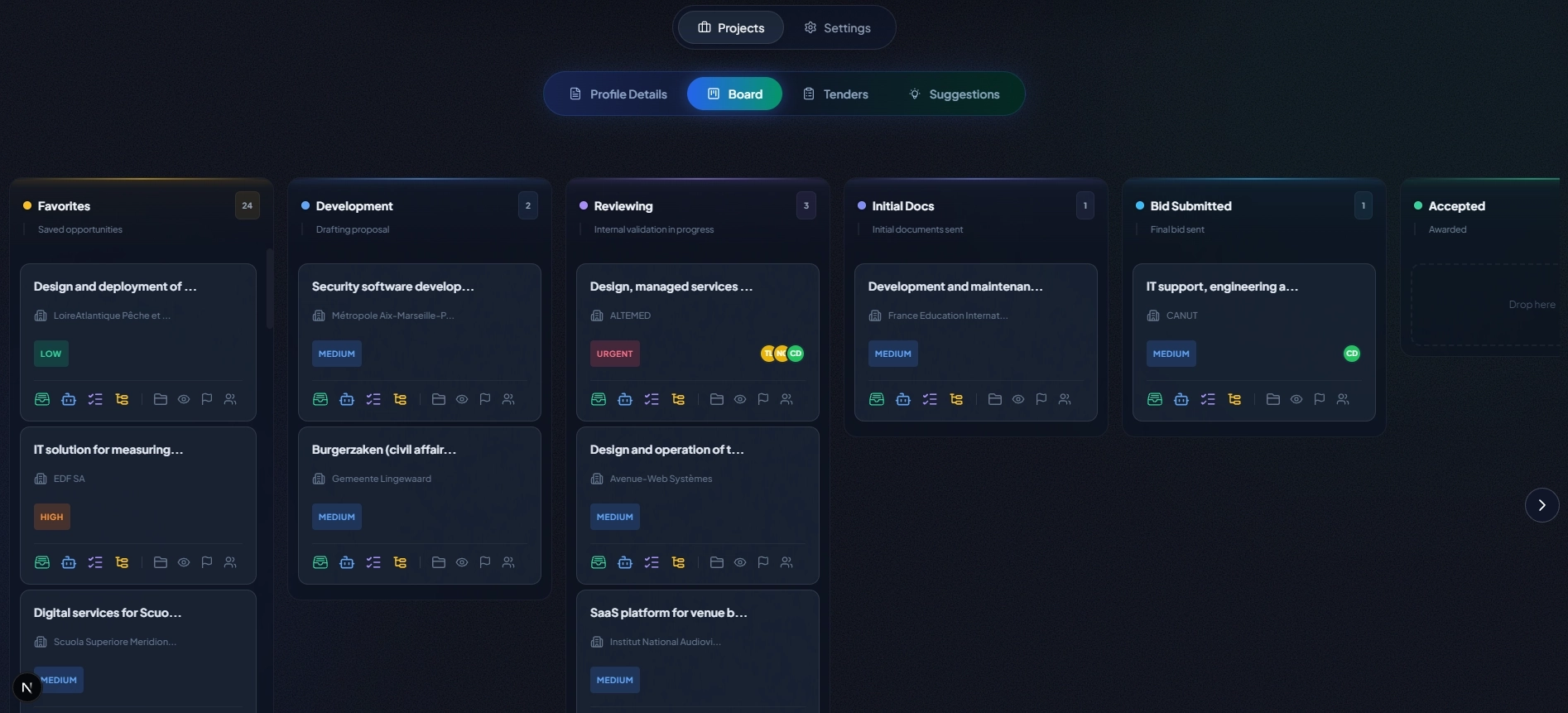
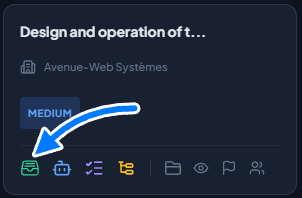
- Click the Documents icon on any tender card. The AI Document Assistant opens in a workspace dedicated to that specific tender.
| Key Advantage Over Generic AI Tools |
|---|
| When you open the AI Document Assistant, it already has all the context: title, description, deadlines, lots, procedure type, and all structured data of the tender—as well as your company profile, AI match score, strengths, weaknesses, strategic recommendations, and suggested questions to ask the buyer. You never need to re-explain your situation. |
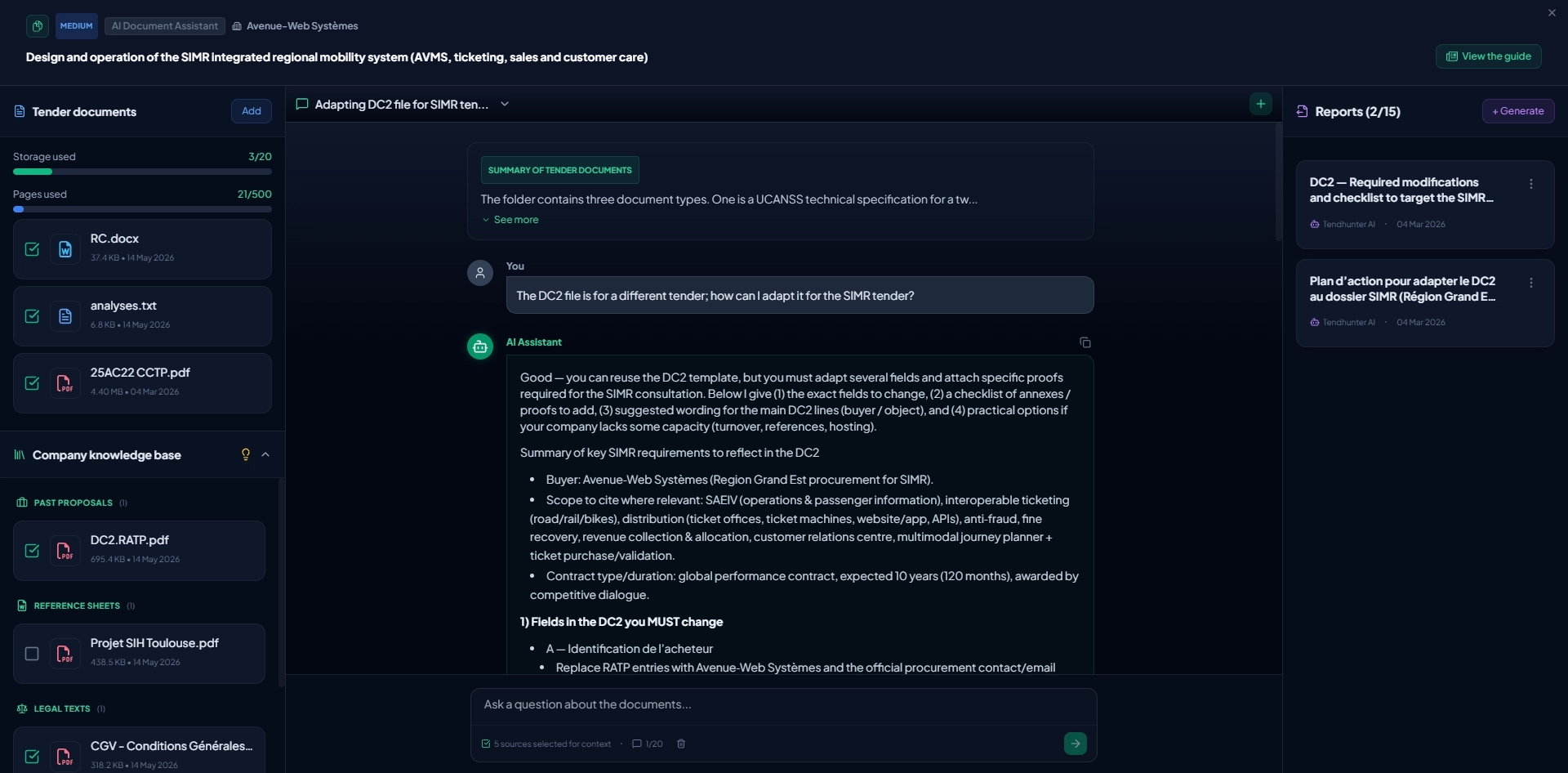
2. Understanding the Three-Panel Interface
Panel 1 — Sources (Left)
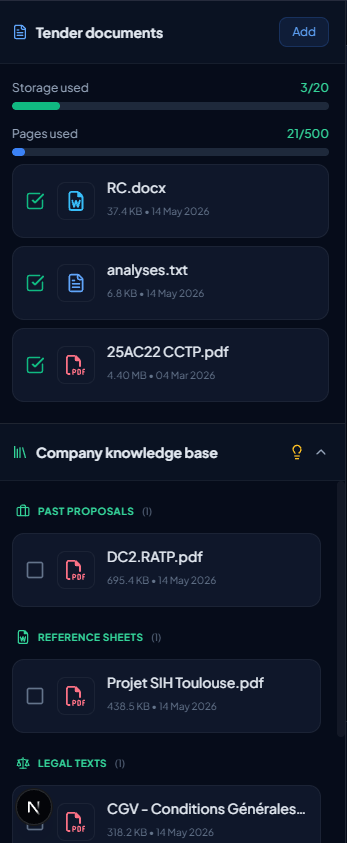
The Sources panel is your document management space for this tender. It is split into two complementary sections:
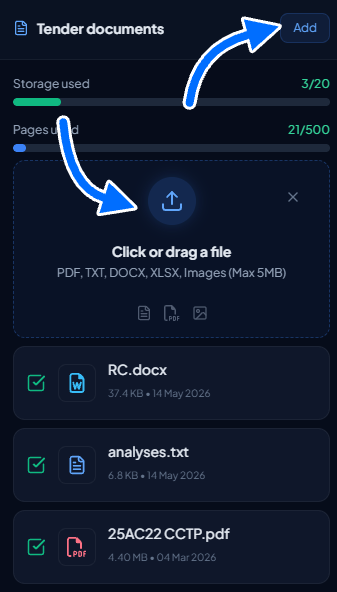
- Tender Documents: the files you upload specifically for this opportunity (CCTP, RC, CCAP, annexes, etc.).
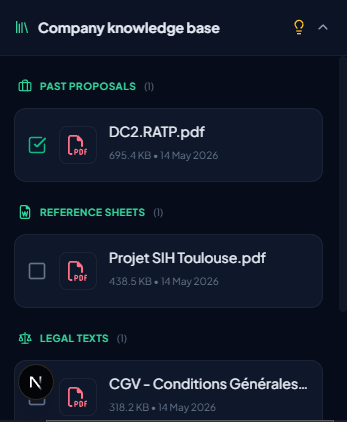
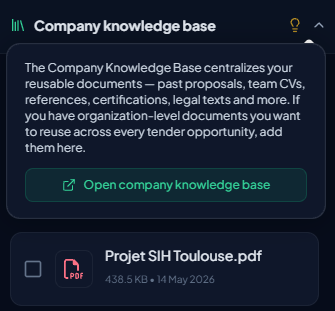
- Company Knowledge Base: your centralized library of reusable documents (past proposals, CVs, certifications, T&Cs, etc.), uploaded only once from your settings and available within every one of your tenders. To learn more about the Company Knowledge Base, consult the complete guide: The Company Knowledge Base Guide.
For each report or question, you retain full control: simply check the relevant documents — whether they come from the tender or from your knowledge base — to precisely target the context used by the AI.
Upload Specifications — Tender Documents
| Parameter | Limit |
|---|---|
| Maximum number of files | 20 files per workspace |
| Maximum number of pages (total) | 500 pages across all files |
| Maximum file size | 5 MB per file |
| Supported formats | PDF, DOCX, XLSX, Images (JPG, PNG, etc.), TXT |
How Sources Work
When you upload a file — whether a tender document or a document from your Company Knowledge Base — the system processes it by extracting text, structure, and key information. Once processing is complete, you can click on the file card to view a summary of its content.
Tender documents are managed directly from this panel (upload, download, delete). Documents from the Company Knowledge Base, on the other hand, are managed centrally from Settings → Documents, and appear here in read-only mode so you can simply select or unselect them as context.

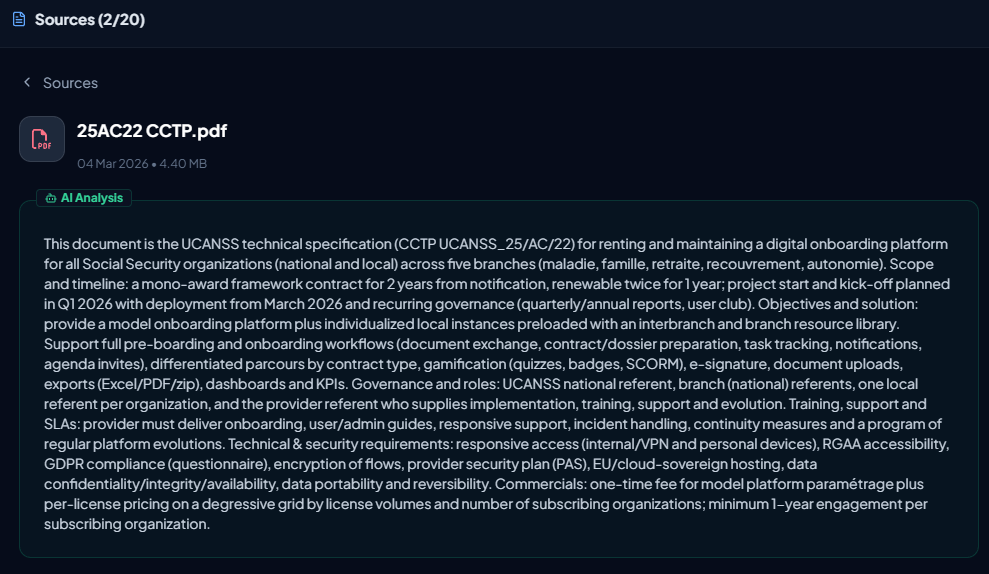
Key point: each source has a checkbox, whether it comes from the tender documents or from your Company Knowledge Base. You can individually check or uncheck each source to precisely control which documents the AI uses as context.
This means you can, for example:
- Generate a report based solely on the tender’s technical specifications.
- Cross-reference the tender CCTP with three past proposals from your knowledge base to draft a first version of your bid.
- compare the tender CCAP with your standard T&Cs stored in the knowledge base to detect contractual divergences.
Every combination of checked boxes yields a perfectly targeted AI analysis.

Panel 2 — Discussion (Center)
The Discussion panel is your direct dialogue interface with TendHunter’s advanced AI agent. Unlike a generic chatbot where you would start from a blank page, this agent already knows the full context of your work before you even ask your first question.
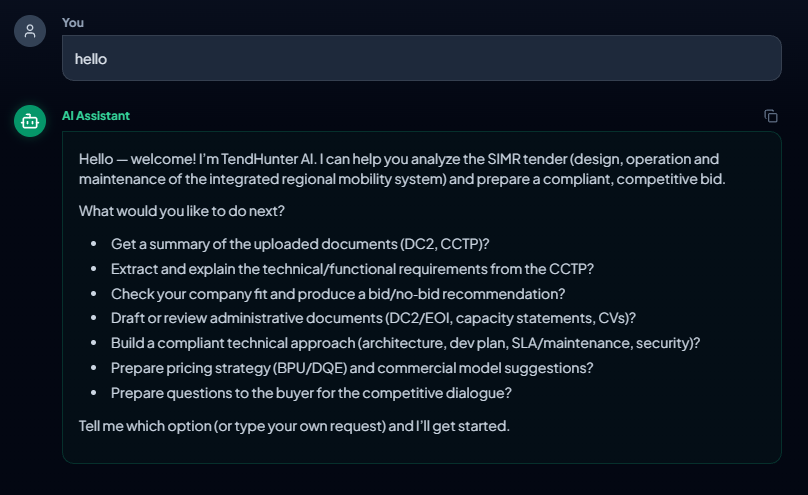
At the top of the discussion session, before the message area, you will always find the global synthesis of all documents uploaded by the user. This synthesis updates automatically whenever the sources change, whether a new document is added or an existing source is removed. Below the synthesis, the chat interface allows you to interact with the AI agent in real time.
What the AI Agent Can Access Before Your First Message
This is the core advantage of the Discussion feature in the AI Document Assistant. The moment you open the panel, the agent can access all of the following information:
| Context Category | Details Available to the Agent |
|---|---|
| Tender Data | Title, description, buyer, deadline, procedure type, lots, estimated value, CPV codes, geographic scope, and all published structured data. |
| Company Project | Project name, summary, specialities, technical capabilities, mastered technologies, certifications, budget range, target countries, preferred languages, and project CPV codes. |
| AI Match Analysis | Overall score, AI reasoning, strengths, points of attention, submission complexity assessment, strategic advice, suggested buyer questions, detailed criteria-by-criteria analysis, and lot-by-lot match scoring. |
| Source Summaries | For each document selected as a source — whether uploaded for this tender or coming from your Company Knowledge Base — the agent accesses the structured summary of the file, allowing it to understand the content without you needing to explain it. |
| Document Search | The agent can perform targeted searches within the full content of selected source documents to locate specific passages, clauses, or data points. |
| With a generic AI tool (ChatGPT, NotebookLM, etc.), you would need to copy-paste the tender context, describe your company, summarise your documents, and re-explain your situation with every new conversation. Here, everything is already there: the full tender context, your company profile, the AI match analysis, AND your company’s documentary assets (past proposals, CVs, certifications, etc.) one click away from your Knowledge Base. You ask the question that matters directly, and the agent responds with complete knowledge of your context AND your know-how. |
|---|
How Discussion Sessions Work
The Discussion panel operates with a session system, allowing you to organise your exchanges by topic or preparation stage.
Session Specifications
| Parameter | Limit |
|---|---|
| Maximum simultaneous sessions | 5 sessions per tender workspace |
| Maximum messages per session | 20 messages per session |
| Source selection | Choose which document sources to use with each message sent |
| History persistence | Full — all sessions and conversations are preserved |
| Session deletion | Available at any time, freeing a slot for a new session |
How to Use Sessions
- Create a new session by clicking the create button. If you don’t have any existing sessions yet, simply send your first message and a session will be created automatically. Each session represents an independent discussion thread.

- Select your sources before sending your message. You can change the document selection with each message, allowing you to precisely target which documents the agent should draw from for its response.
- Ask your question or formulate your request in the input field, then send. The agent analyses your question, consults the selected sources, performs searches within the documents if necessary, and responds with precision.
- Continue the dialogue by asking follow-up questions, requesting clarifications, or exploring new angles. The agent retains the full thread of the conversation and responds with awareness of the entire preceding exchange.
Organising Sessions by Topic
We recommend dedicating each session to a specific topic or stage of your bid preparation. Here is an example of effective organisation for a tender:
| Session | Topic | Recommended Use |
|---|---|---|
| 1 | Tender Analysis | Understand requirements, ask questions about technical specs, clarify evaluation criteria |
| 2 | Administrative Compliance | Verify required documents, deadlines, submission formats, eligibility conditions |
| 3 | Bid Strategy | Discuss price positioning, which lots to target, competitive differentiation |
| 4 | Legal & Contractual | Analyse contract clauses, contractual risks, penalties, and guarantees |
| 5 | Open Questions | Any additional queries, last-minute checks, presentation preparation |
Persistent history: When you leave the AI Document Assistant page and return later, all your sessions and conversations are preserved. You pick up exactly where you left off and can continue your exchanges without any loss of information.
Dynamic Source Selection with Every Message
A particularly powerful feature of the Discussion panel is the ability to change your selected sources with each message you send. This means that within a single session, you can:
- Ask a first question with only the technical specifications selected to analyse the technical requirements.
- Ask the next question with the consultation rules selected to understand how those requirements will be evaluated.
- Then select the administrative conditions to check the contractual implications of a specific point.
This flexibility gives you total control over the agent’s analysis scope. When you ask a technical question, the agent searches the technical specs. When you ask an administrative question, it searches the consultation rules. You guide the agent to the right sources, and it returns the most accurate answers possible.
| Practical Tip : If your question relates to a specific point in a single document, select only that document as a source. Conversely, when you want to cross-reference the buyer’s needs with your know-how, intelligently combine both origins: for example, the tender CCTP + two past proposals from your Knowledge Base to obtain a draft firmly anchored in your methodology, or the tender CCAP + your T&Cs to detect legal gaps. |
|---|
Panel 3 — Reports (Right)
The Reports panel is where the real analytical power resides. It allows you to generate reports through our AI agent.
How to Generate a Report
- Select your sources: In the Sources panel, check the documents you want to use as context. You can freely combine:
- Documents specific to this tender (CCTP, RC, CCAP, etc.),
- Relevant documents from your Company Knowledge Base (past proposals, CVs, certifications, references, etc.).
- Click "Generate": An input field appears where you type your prompt — the instruction that tells the AI what type of report to produce.
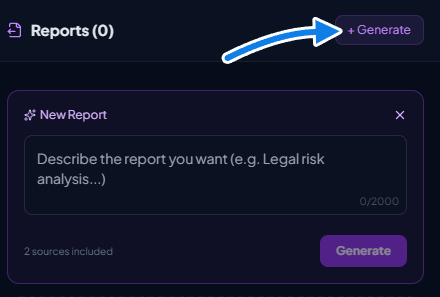
- Write your prompt and confirm: Click Generate. The AI processes your request (this may take a moment depending on the document volume).
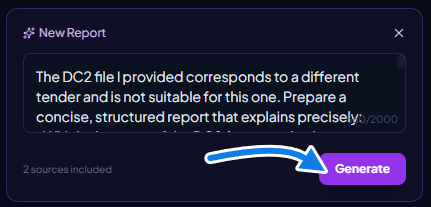

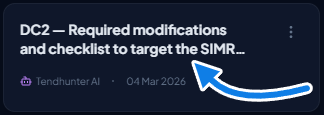
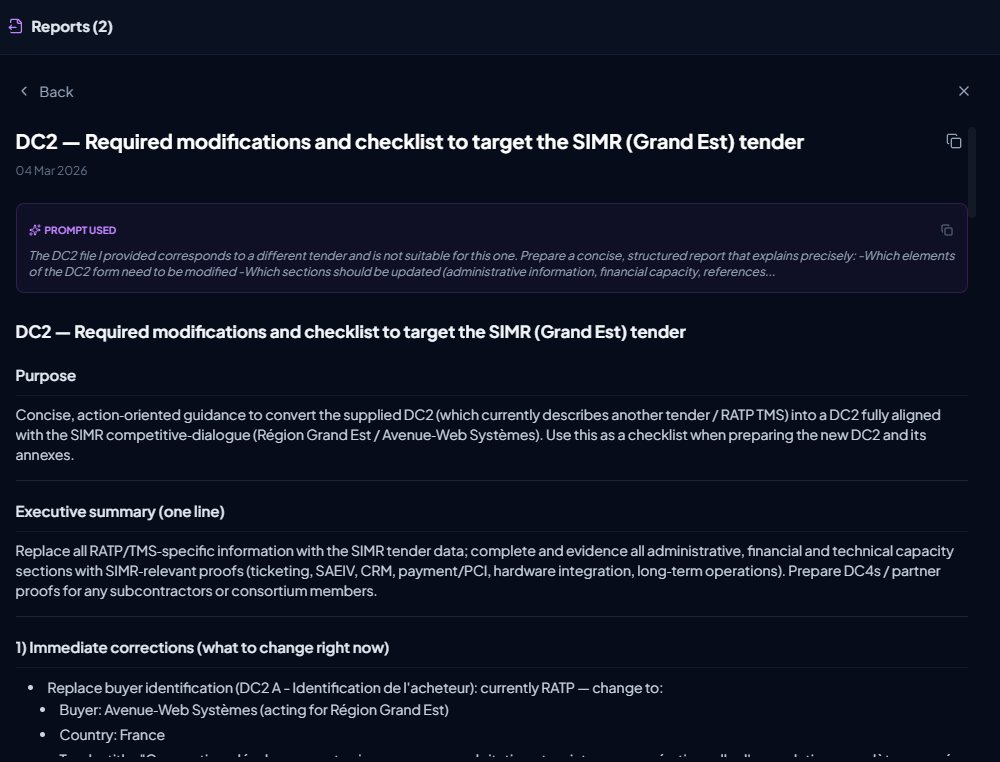
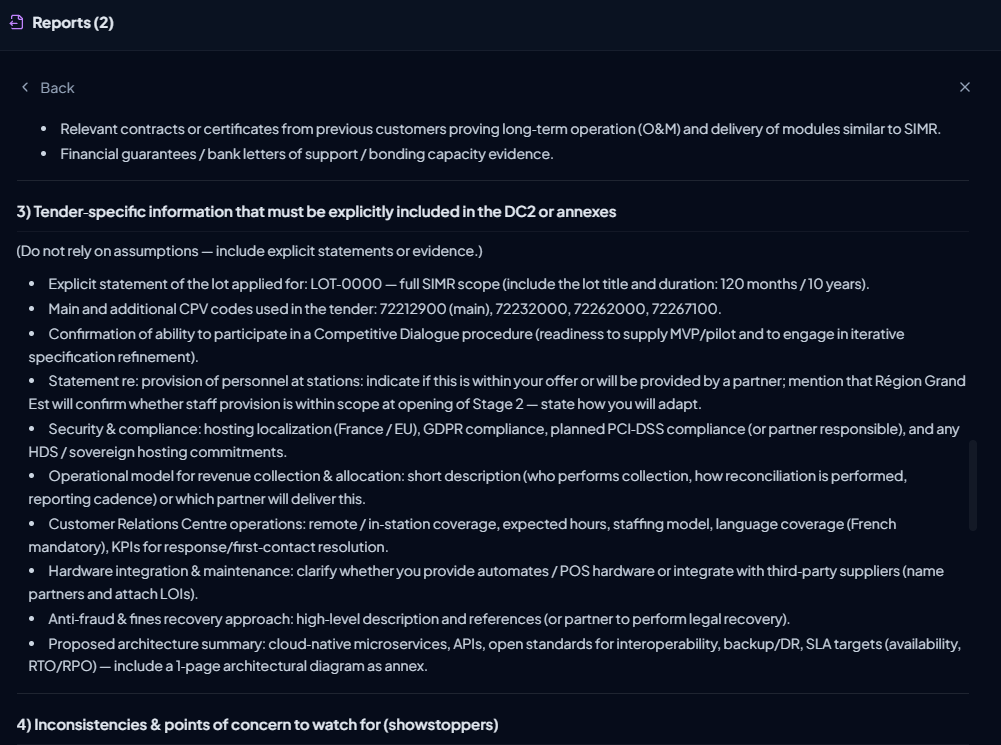
- Review and use the report: A report card appears in the panel. Click on it to expand the view. The report retains full formatting: headings, subheadings, lists, tables, and structured content.
Working with Generated Reports
- Use the copy icon next to the report title to copy the entire content, preserving all formatting (headings, tables, lists) for pasting into Word, Google Docs, or any rich text editor.
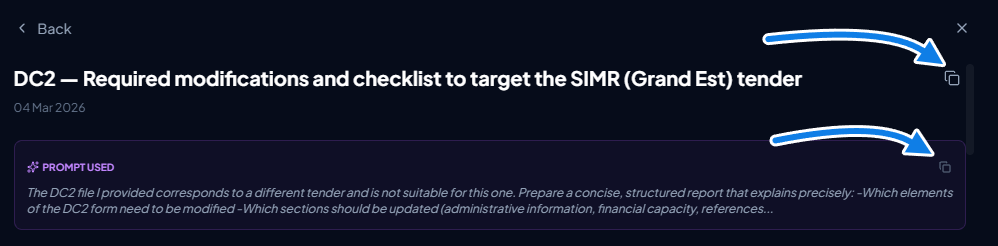
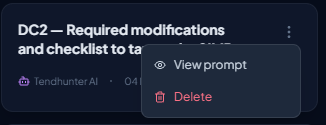
- View the original prompt used to generate any report by clicking on the prompt display area.
- Delete reports you no longer need directly from the panel.
- Generate as many reports as needed for different aspects of the same tender.
3. What Makes the AI Document Assistant Unique
Several AI-powered document tools exist on the market, including Google's NotebookLM and ChatGPT. TendHunter's AI Document Assistant stands out through its deep contextual integration with the bid preparation and submission process.
Built-in Tender Intelligence
Unlike generic AI tools where you start from a blank page, TendHunter's AI Document Assistant already knows:
- All the structured tender data: title, buyer, deadline, procedure type, lots, estimated value, geographic scope, CPV codes, and all published details.
- Your company project profile: specialties, technical capabilities, technologies, certifications, budget range, target countries, and languages.
- The AI match analysis: overall score, strengths, weaknesses, complexity assessment, strategic advice, suggested questions for the buyer, and lot-by-lot scoring.
- Your Company Knowledge Base: past proposals, team CVs, reference sheets, certifications, T&Cs, and any other internal document you have chosen to centralize. The AI can draw on it to suggest wording, identify the right profiles, or reuse structures that have already proven successful.
This means every AI-generated report/message is automatically enriched with this intelligence. You don't need to re-explain who you are, what the tender is about, or how well you match. The AI connects all the dots for you.
Formatting That Transfers
Reports and messages are generated with full structural formatting. When you copy the content, headings remain headings, tables remain tables, and lists remain lists — ready to be integrated directly into your bid documents.
4. Which Files to Upload?
European public procurement follows structured documentation standards. Here is a guide to the key documents to make available to the Assistant, organized into two families: those you upload one-off for each tender, and those you centralize only once in your Company Knowledge Base.
Main Tender Dossier Documents
The Tender Dossier (DCE — Dossier de Consultation des Entreprises) is the complete set of documents made available by the contracting authority. Across the EU, equivalent dossiers exist under different names.
| Document | Description | EU Equivalents |
|---|---|---|
| RC (Consultation Rules) | The consultation rules: eligibility criteria, evaluation methodology, submission format, required documents, deadlines. | DE: BewerbungsbedingungenNL: AanbestedingsleidraadIT: Disciplinare di gara |
| CCTP (Technical Specifications) | The detailed technical specifications: scope of work, deliverables, quality standards, performance requirements. | DE: LeistungsverzeichnisNL: Programma van EisenIT: Capitolato Tecnico |
| CCAP (Administrative Conditions) | The administrative and contractual conditions: payment terms, penalties, liability, insurance, guarantees, dispute resolution. | DE: Besondere VertragsbedingungenNL: Algemene inkoopvoorwaardenIT: Capitolato Amministrativo |
| BPU / DQE (Price Schedule) | The pricing framework: unit price tables and estimated quantities that you must complete as part of your financial offer. | DE: Leistungsverzeichnis mit PreisenNL: PrijslijstIT: Elenco Prezzi Unitari |
| AE (Formal Commitment) | The formal commitment document: the legally binding agreement you sign to confirm the terms of your bid. | DE: AngebotsschreibenNL: InschrijvingsbiljetIT: Offerta Economica |
| ESPD / DC Forms | European Single Procurement Document: declarations on eligibility, financial standing, technical capacity. | Standardized across all EU Member States |
Additional Documents to Upload in the Tender “Sources” Panel
Beyond the main tender dossier, consider uploading the following into the tender workspace:
- Technical annexes, appendices, plans, technical drawings or diagrams (as images or PDF).
- Clarification Q&A documents published by the buyer after the initial publication.
- Previous framework agreement documents if the tender is a subsequent contract under an existing agreement.
Documents to Centralize in Your Company Knowledge Base
Upload these reusable documents only once; they will then be available across all your tenders:
- Past proposals — to reuse wording and approaches that have already proven successful.
- Team CVs — so the AI can identify and suggest the most relevant profiles.
- Reference sheets — to demonstrate your experience on similar projects.
- Certifications — ISO 9001, ISO 27001, etc., to quickly validate your compliance.
- Legal documents — T&Cs, standard clauses, other legal documents.
- Internal documents / Other — CSR policies, corporate presentations, product sheets, etc.
5. Making the Most of Your Company Knowledge Base
The AI Document Assistant is connected to a second, far more durable, content reservoir: your Company Knowledge Base.
The principle in one sentence
“Upload once, use everywhere.”
Instead of re-uploading the same CVs, certifications, or reference proposals for every tender, you centralize them only once in a library accessible from Settings → Documents. These documents are then automatically offered in the Sources panel of every tender, ready to be selected as context by the AI.
What this changes in practice
- Your past proposals serve as templates for drafting new bids.
- The AI can suggest, from your team CVs, the profiles most aligned with the requirements of a given lot.
- Your T&Cs can be automatically compared with the CCAP to spot contractual divergences.
- Your certifications (ISO 9001, ISO 27001, WCAG, etc.) can be mobilized in a single click to answer a compliance criterion.
Combining both source origins
The real benefit emerges when you combine the two: a report generated on the tender CCTP + three past proposals gives you a draft directly aligned with your style, methodology, and language. That cross-referencing is what turns the AI into a true tender response co-pilot.
To go further: the step-by-step instructions for setting up, organizing, and managing your Company Knowledge Base (categories, active/archived status, detailed limits, advanced use cases) are described in our dedicated guide: The Company Knowledge Base Guide.
6. Discussion or Reports? When to Use Each Panel
The Discussion and Reports panels are complementary. Here is how to choose the right tool based on your need:
| Need | Discussion | Reports |
|---|---|---|
| Quick question on a specific point | ✓ Ideal | ✗ Too heavy |
| Clarify a legal clause | ✓ Ideal | ✗ Not suited |
| Complete compliance matrix | ✗ Too long for chat | ✓ Ideal |
| Explore a topic step by step | ✓ Ideal | ✗ Static |
| Detailed report to include in the bid | ✗ Format not suited | ✓ Ideal |
| Check a detail in a document | ✓ Ideal | ✗ Too heavy |
| Full strategic analysis | ✓ To start exploring | ✓ For the final version |
| Prepare questions for the buyer | ✓ Discuss then refine | ✓ For the formal version |
| Last-minute double-check | ✓ Ideal | ✗ Too slow |
| Understand a technical or legal term | ✓ Ideal | ✗ Not suited |
| Cross-reference a tender with your past proposals / CVs / certifications | ✓ To quickly identify the right items to reuse | ✓ To produce a structured deliverable (profile matrix, technical memo draft, etc.) |
| Recommendation : For detailed, structured responses that are ready to be integrated into your bid documents, use the Reports panel. Use the Discussion to explore, question, understand, and verify — then generate a report when you need a formal deliverable. |
|---|
7. Use cases for messages
Here are concrete examples of messages you can send to the AI agent, organised by situation. For each example, we indicate which sources to select and explain why the Discussion is particularly effective.
Understanding Tender Requirements
Situation: You have just uploaded the 86-page technical specifications and want to quickly grasp the key points before diving into a detailed read.
Sources to select: Technical Specifications (CCTP / Leistungsbeschreibung)
| Example Message: What are the 5 most critical technical requirements in these specifications? For each one, tell me whether our company profile addresses it. |
|---|
Why Discussion is ideal here: You get an answer in seconds, and you can immediately ask follow-up questions about each identified requirement. A report would be too heavy for this exploratory need.
Possible follow-up:
| Example Message: You mentioned the ISO 27001 certification requirement for healthcare data. Where exactly in the specifications is this mentioned, and what are the exact terms used? |
|---|
Clarifying Legal or Contractual Clauses
Situation: While reading the administrative conditions, you come across a late delivery penalty clause that you do not fully understand.
Sources to select: Administrative Conditions (CCAP / Besondere Vertragsbedingungen)
| Example Message: Explain the late delivery penalty clause in the administrative conditions in plain language. What is the daily penalty amount, is there a cap, and is this negotiable within this type of procedure? |
|---|
Why Discussion is ideal here: The agent locates the exact clause in the document, rephrases it clearly, and puts it in perspective with your company profile and standard public procurement practices. The dialogue then allows you to dig further: “is this penalty within the normal range?”, “how do other companies typically manage this risk?”.
Defining Your Bid Strategy
Situation: You are hesitating between bidding on all lots or focusing on certain ones.
Sources to select: Consultation Rules (RC) + Technical Specifications (CCTP)
| Example Message: Given our company profile and the lot-by-lot match score, which lots give us the best chances? Give me your reasoned opinion with the strengths and risks for each lot. |
|---|
Why Discussion is ideal here: The agent automatically cross-references each lot’s requirements with your company profile AND the match analysis already calculated by TendHunter. You get instant strategic advice, and you can then discuss: “if we partner with someone for lot 2, does that change the picture?”.
Possible follow-ups:
| Example Message: For lot 3 where you identified a weakness in compliance auditing, what type of partner should we look for? What certifications should they hold to complement our profile? |
|---|
Identifying the right profiles to staff a lot
Situation: The CCTP of lot 2 describes precise skill requirements (cloud, cybersecurity, GDPR) and you want to know which team members to propose in your bid.
Sources to select: Tender CCTP + your team CVs from the Company Knowledge Base.
| Example Message: Which profiles on our team match the skill requirements of lot 2? For each suggested profile, tell me which specific CCTP requirements they cover and any remaining gaps to close. |
|---|
Why Discussion is ideal here: The agent cross-references in real time the CCTP requirements with the CVs stored in your knowledge base and produces a reasoned shortlist. You can then refine: “add Sophie M.’s CV to the selection, and check whether she meets the ISO 27001 requirement”.
8. Use cases for reports
The following scenarios illustrate how companies from different Member States use the AI Document Assistant to gain a competitive edge.
Use Case 1: French IT Services Company Bidding on a Public Hospital Contract
| Company | A mid-sized IT services company based in Lyon, specializing in healthcare information systems |
|---|---|
| Contract | Modernization of the Hospital Information System (HIS) of a University Hospital Center (CHU) |
| Lots | Lot 1: Core HIS Platform — Lot 2: Interoperability Middleware — Lot 3: Cybersecurity Audit |
| Estimated Value | €2.4M over 4 years |
Documents Selected as Sources
From the “Tender Documents” panel:
- RC (Consultation Rules)
- CCTP (Technical Specifications)
- CCAP (Administrative Conditions)
- BPU (Unit Price Schedule)
- Technical annex: existing network architecture
From the Company Knowledge Base:
- Two past proposals on similar HIS contracts
- CVs of the company’s healthcare architects
- Company ISO 27001 and HDS certifications
Prompts Used and Reports Generated
Report 1: Technical Requirements Extraction
| Sample Prompt:Analyze the CCTP and extract a comprehensive list of all technical requirements, functional specifications, and performance criteria for Lot 1 (Core HIS Platform). Organize them by category (functional requirements, non-functional requirements, integration requirements, security requirements). For each requirement, indicate the priority level if mentioned and flag any requirement where our company profile has a potential gap. |
|---|
The AI agent generated a structured report with each technical requirement organized into tables, with a column flagging three potential gap areas: HL7 FHIR R4 certification (not yet listed in the profile), 99.99% availability SLA (the company's standard offering is 99.9%), and an on-premise deployment requirement in addition to cloud (the company specializes exclusively in cloud).
Report 2: Administrative Compliance Checklist
| Sample Prompt:Based on the RC and CCAP, generate a complete administrative compliance checklist for our submission. Include every required document, certificate, form, and declaration, with the exact deadline, required format, and whether it must be originals or copies. Highlight any requirement that seems unusual or particularly strict. |
|---|
The resulting report listed 23 distinct submission requirements, correctly identifying that the buyer required ISO 27001 certification specifically mentioning healthcare data, and that the bid bond amount was set at 3% of the contract value — higher than the usual 2% — flagging this as a point of attention.
Report 3: Pricing Strategy Analysis
| Sample Prompt:Analyze the BPU and the evaluation criteria from the RC. The price weighting appears to be 40% and technical merit 60%. Suggest a pricing strategy: which line items are likely volume levers, where do we have margin flexibility, and where might competitors undercut us. Cross-reference with our capabilities to identify where we can offer added value justifying a premium price. |
|---|
The AI agent produced a strategic analysis identifying that maintenance and support services represented 35% of the total estimated value, and recommended the company highlight its 24/7 French-language support capability as a differentiator to justify slightly higher unit rates on support line items.
Report 4: Technical Memo Draft Based on Past Proposals
| Sample Prompt:Drawing on the CCTP of this tender and the two past proposals from our knowledge base, generate a structured draft of the technical memo for Lot 1. Reuse our standard methodology (phases, governance, transition plan), adapting it to the CHU’s specific requirements. Highlight in callouts the passages that need to be manually rewritten because they were too specific to a previous client. |
|---|
The AI agent produced a 14-section technical memo draft replicating the structure of the past proposals (introduction, understanding of the need, methodology, governance, deployment plan, quality plan, business continuity plan, etc.), while injecting the specific CCTP requirements of the CHU. It explicitly flagged six paragraphs containing references to the previous client (names of individuals, project references) for rewrite prior to submission.
Use Case 2: German Engineering Firm Bidding on a Bundeswehr Contract
| Company | A civil engineering firm based in Munich, experts in energy-efficient building renovation |
|---|---|
| Tender | Energy renovation of military barracks in Bavaria |
| Procedure | Restricted procedure (Nichtoffenes Verfahren): prequalification phase followed by an invitation to tender |
| Estimated Value | €8.1M |
Documents Uploaded as Sources
- Leistungsbeschreibung (technical specifications)
- Bewerbungsbedingungen (participation conditions)
- Besondere Vertragsbedingungen (special contractual conditions)
- Energieausweis of existing buildings (energy performance certificates) scanned images
- Company reference project portfolio (PDF)
Prompts Used and Reports Generated
Report 1: Prequalification Readiness Assessment
| Sample Prompt:We are at the prequalification stage. Analyze the Bewerbungsbedingungen and identify all selection criteria, minimum thresholds, and required evidence. Then compare with our company profile and match analysis. Produce a gap analysis table: for each criterion, show what is required, what we have, and whether we meet, partially meet, or do not meet the threshold. Recommend actions to close gaps. |
|---|
The AI agent produced a comprehensive gap analysis revealing the company fully met 11 of 13 criteria. For the remaining two — minimum annual turnover of €5M in similar contracts (the company's relevant turnover was €4.2M) and a security clearance requirement for military facilities — it recommended exploring a joint venture with a larger partner and immediately initiating the VS-NfD clearance application.
Report 2: Energy Renovation Technical Approach
| Sample Prompt:Based on the Leistungsbeschreibung and existing energy performance certificates, generate a structured technical approach plan for the energy renovation. Identify key technical challenges, suggest appropriate renovation methodologies (referencing German EnEV/GEG standards), and highlight areas where our passive house renovation experience gives us a competitive advantage. Include a risk register for the construction phase. |
|---|
The AI agent generated a technical approach framework referencing specific GEG (Gebäudeenergiegesetz) requirements, identified likely asbestos presence in the 1970s buildings as a main challenge from construction dates mentioned in the specifications, and highlighted the company's passive house certification as a strong differentiator, given the contract's emphasis on sustainability criteria.
Use Case 3: Belgian Cybersecurity Firm Targeting a European Commission Framework Agreement
| Company | A cybersecurity firm based in Brussels, specializing in penetration testing and security audits for European institutions |
|---|---|
| Contract | Framework agreement for ICT security services for a Directorate-General of the European Commission |
| Lots | Lot 1: Penetration Testing — Lot 2: Security Operations Center (SOC) — Lot 3: Compliance Audit |
| Duration | 4 years with a 2-year extension option |
Documents Uploaded as Sources
- Contract specifications (in English)
- Draft framework agreement
- Technical annexes with security architecture requirements
- ESPD form guide
Prompts Used and Reports Generated
Report 1: Lot-by-Lot Fit Analysis
| Sample Prompt:For each of the three lots, produce a detailed analysis of our company's fit. Use the AI match data and our profile to assess our alignment with each lot's requirements on a Strong / Moderate / Weak scale. Recommend which lots we should bid on, and for any lot where we are weak, suggest the type of consortium partner to look for. Include a staffing estimate for each lot based on the expected workload described in the specifications. |
|---|
The AI recommended focusing on Lot 1 (rated Strong) and Lot 3 (rated Strong), while suggesting a consortium for Lot 2 with a partner having an established 24/7 SOC, as the company's current operations were limited to business hours. The staffing estimate projected 8 FTEs for Lot 1, 15 FTEs for Lot 2 (including partner staff), and 5 FTEs for Lot 3.
Report 2: Contractual Risk Assessment
| Sample Prompt:Review the draft framework agreement and identify all clauses presenting financial, operational, or legal risks to our company. For each risk clause, explain the risk, rate its severity (High / Medium / Low), and recommend whether we should accept, negotiate, or flag it as a deal-breaker. Pay particular attention to liability caps, intellectual property, SLA penalties, and audit rights. |
|---|
The AI flagged 14 concerning clauses, rating three as High risk: unlimited liability for data breaches (recommending negotiating a cap at the contract value), a clause requiring source code escrow for all tools developed during the contract, and a 48-hour incident response SLA with penalties of 0.5% of the contract value per incident — which the AI noted could accumulate rapidly in the event of simultaneous incidents.
Conclusion
TendHunter's AI Document Assistant is more than a productivity tool; it's a strategic amplifier. By deeply understanding the context of your company and the specific tender you're targeting, it enables you to move faster, reduce errors, and focus on what truly matters: crafting a proposal that demonstrates why you're the best choice.
Whether you're a French IT SME bidding on your first hospital contract, a German engineering firm navigating military procurement, a Spanish consultancy bidding cross-border in Portugal, or a Belgian cybersecurity firm targeting a European institution framework agreement, the AI Document Assistant meets you where you are and helps you compete at a higher level.
The competitive advantage in public procurement increasingly belongs to companies that can analyze faster, respond smarter, and submit more comprehensive bids. TendHunter's AI Document Assistant gives you that edge.